
MyRocks: LSM-Tree Database Storage Engine Serving Facebook's Social Graph
Table of contents
- Paper at a glance
- 1. Brief Overview of UDB (User Database)
- 2. InnoDB, B+Trees, and Magnetic Hard Drives (HDDs)
- 3. The Flash SSD Shift: From IOPS to Capacity Bottlenecks
- 4. B+Tree Fragmentation and Space Amplification
- 5. InnoDB Compression Limits & The “Internal Padding” Problem
- 6. MyRocks Project Goals
- 7. UDB and the TAO Cache Tier
- 8. RocksDB LSM-Tree Architecture
- 9. Auto-Solved Issues in LSM: No Fragmentation
- 10. RocksDB Compression Efficiency
- 11. Core LSM Challenges & MyRocks Solutions
- a) Minimizing Key Comparisons
- b) Optimizing Reverse Scans
- c) Optimizing Range Seeks
- d) Reducing Tombstone Lifetimes
- e) SSD Compaction, TRIM, & SSD Write Stalls
- f) Bulk Loading
- 12. Links
Paper at a glance
This paper details Meta’s migration of its User Database (UDB) tier, which serves Facebook’s social graph, from the B+Tree-based InnoDB storage engine to the LSM-Tree-based MyRocks storage engine (built by running MySQL on top of RocksDB). By moving to an LSM-tree-based engine optimized for flash SSDs, Meta successfully reduced database storage space by 62.3% and halved the number of database servers required for UDB, while maintaining strict OLTP requirements for transaction isolation, read performance, and tail latency stability.
1. Brief Overview of UDB (User Database)
Facebook’s User Database (UDB) serves as the persistent repository for the social graph. UDB is responsible for handling high-volume OLTP workloads that represent connections, users, posts, and likes. Because this social graph underpins every interaction on Facebook, UDB requires highly reliable transactions, low latency, and efficient storage scaling to handle the astronomical growth of user data.
2. InnoDB, B+Trees, and Magnetic Hard Drives (HDDs)
Historically, UDB ran on MySQL using the standard InnoDB storage engine, which is built on the B+Tree data structure. In the era of magnetic hard disk drives (HDDs):
- Disk Characteristic: Physical spinning disks have high latency for random operations due to seek time (moving the disk arm).
- The Bottleneck: The legacy UDB setup quickly saturated the hard drive’s Input/Output Operations Per Second (IOPS) capacity. The disk heads could not physically keep up with random reads and writes, leaving the host CPU mostly idle while waiting for disk operations to complete.
- Write Inefficiency: InnoDB updates data in-place by writing to 16KB leaf pages. This requires frequent random writes across the disk surface, worsening the IOPS limitation of HDDs.
3. The Flash SSD Shift: From IOPS to Capacity Bottlenecks
As hardware evolved, Facebook transitioned its UDB infrastructure to Solid State Drives (Flash/SSDs). This shift fundamentally altered the database bottleneck:
- The Pro: Flash drives effectively removed IOPS bottleneck. SSDs could handle thousands of random disk operations per second without breaking a sweat, allowing database threads to utilize CPU cycles rather than blocking on disk I/O.
- The Con: Flash storage was significantly more expensive per gigabyte than traditional magnetic HDDs.
- The New Bottleneck: Because the database was no longer bound by I/O throughput (IOPS), the bottleneck shifted from performance to storage capacity. Facebook was filling up the physical capacity of their expensive flash drives long before hitting performance or I/O limits. Minimizing storage footprint via compression and space optimization became the engineering team’s highest priority.
4. B+Tree Fragmentation and Space Amplification
Under InnoDB, B+Trees suffer from severe space amplification due to internal fragmentation. This fragmentation is a direct consequence of B+Tree mechanics:
- In-Place Updates: InnoDB updates data inside existing leaf pages. When rows are deleted, empty gaps are left within these pages.
- Page Splits: When a new row is inserted into a page that is already full, InnoDB splits the page into two, typically leaving both resulting pages only 50% to 75% full.
- Persistent Gaps: Over time, these gaps accumulate, causing the database to occupy far more disk space than the actual payload data warrants. Reclaiming this fragmented space requires expensive
OPTIMIZE TABLEoperations that rebuild the table, which is operationally costly at Facebook’s scale.
5. InnoDB Compression Limits & The “Internal Padding” Problem
Compression was also limited in InnoDB. Default InnoDB data block size was 16KB and table level compression required predefining the after-compressed block size (key_block_size), to one of 1KB, 2KB, 4KB or 8KB. This is to guarantee that pages can be individually updated, a basic requirement for B-tree/B+tree. For example, if key_block_size was 8KB, then even if 16KB data was compressed to 5KB, actual space usage was still 8KB, so the storage savings was capped at 50%
6. MyRocks Project Goals
When Meta started the project, the primary goal was to reduce the number of UDB servers by 50%. Achieving that required the MyRocks space usage to be no more than 50% of the compressed InnoDB format, while maintaining comparable CPU and I/O utilization.
7. UDB and the TAO Cache Tier
To shield UDB from direct user traffic, Facebook operates a massive distributed cache tier called TAO (The Association Object cache):
- Role: TAO is a distributed write-through caching tier that handles Facebook’s social graph queries (representing nodes like users, and edges like friendships or likes).
- Mapping: TAO maps graph-structured requests into individual rows stored in the relational databases of the UDB tier.
- Traffic Pattern: Because TAO absorbs the vast majority of read operations, UDB’s workload is highly write-intensive and dominated by point lookups and updates that bypass the cache during mutations.
8. RocksDB LSM-Tree Architecture
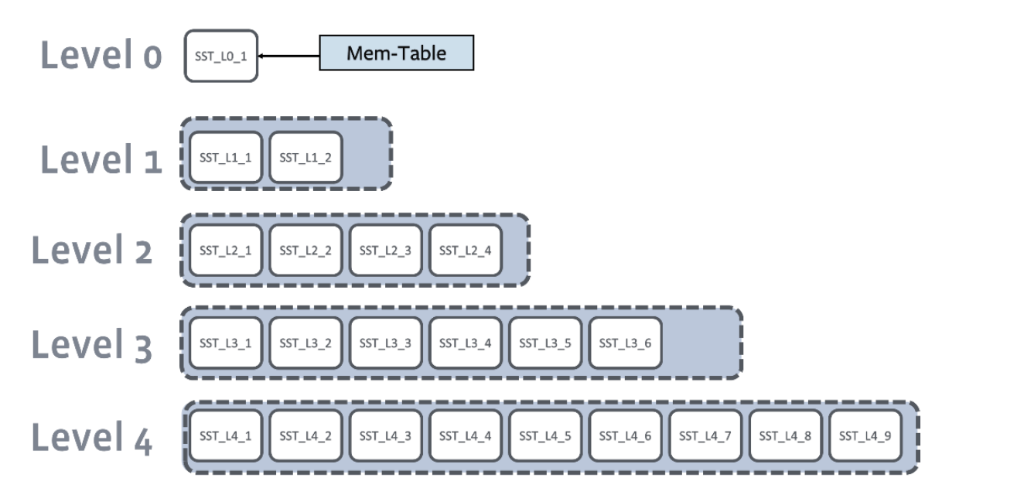
MyRocks replaces InnoDB with RocksDB, an embeddable Log-Structured Merge-tree (LSM) key-value store. RocksDB operates on a layered write and compaction architecture:
- Write Path: Writes are first written to a sequential Write Ahead Log (WAL) on disk for crash recovery, and then appended to the in-memory buffer called the MemTable.
- SST Flushes: When the MemTable fills up, its contents are flushed to disk as an immutable Sorted Strings Table (SST) file. Within each SST, data is stored in sorted order and split into blocks, accompanied by an index block to facilitate binary searching.
- LSM Levels: SST files are organized into levels (L0, L1, …, Lmax) of exponentially increasing size. L0 files can have overlapping key ranges, while levels L1 and beyond contain non-overlapping files.
- Compaction: To maintain size constraints at each level, RocksDB merges SST files from Level-L with overlapping SST files in Level-(L+1). This background process is called Compaction, sorting and rewriting data to clean up stale versions or deleted keys, eventually pushing active data down to Lmax.
9. Auto-Solved Issues in LSM: No Fragmentation
Moving to an LSM-tree architecture automatically eliminates the fragmentation problem inherent to B-Trees:
- Sequential Flushes: Because RocksDB only writes SST files sequentially during MemTable flushes and compaction, keys are packed contiguously without internal page gaps.
- No In-Place Updates: Modifications are written as new updates or tombstones. Old versions are discarded entirely during compaction, ensuring that disk space is packed tightly and fragmentation is non-existent.
10. RocksDB Compression Efficiency
Unlike InnoDB, RocksDB does not require compressed blocks to align with a fixed page boundary:
- No Page Constraints: If a block of data compresses from 16KB to 5KB, RocksDB writes exactly 5KB to the SST file.
- Offset-Based Indexes: This is possible because RocksDB’s index block contains the exact start offset and size of each compressed data block, eliminating any requirement to align blocks to fixed boundaries (such as 8KB).
- Granular Savings: By storing variable-sized compressed blocks sequentially on disk without “internal padding” or grid alignment, RocksDB achieves significantly higher compression ratios than InnoDB, maximizing storage efficiency on expensive flash SSDs.
11. Core LSM Challenges & MyRocks Solutions
While LSM-trees solve fragmentation and compression issues, they introduce specific challenges that MyRocks had to address:
a) Minimizing Key Comparisons
-
The Problem: In a B+tree, looking up a key requires only one binary search per page. In an LSM-tree, since data is split across multiple sorted runs, we must perform a binary search for each sorted run and merge them using a heap. This drastically increases key comparisons on the read path. If comparisons require executing complex, type-specific database collations, the read path becomes heavily CPU-bound.
-
The Solution (Mem-comparable Keys): The work is shifted to the write path. When MyRocks inserts or updates a row, it encodes each indexed column into a sortable binary representation. This allows RocksDB to compare keys using raw byte comparison (
memcmp) rather than complex type-specific collation checks. -
Unicode Collation Algorithm (UCA): For case-insensitive collations (e.g.,
utf8mb4_general_ci), MySQL rules dictate thatABC == abc == AbC. To avoid executing these complex collation rules during every comparison on the read path, MyRocks computes a weight string on the write path using the following two steps:Step 1. Every character has a weight Imagine a very simplified collation table:
Character Weight A 100 a 100 B 200 b 200 C 300 c 300 Notice that
Aandahave the same weight because the collation is case-insensitive.Step 2. Replace every character by its weight
- Suppose the string is
ABC. MySQL computes:100 200 300 - For
abc, it computes:100 200 300
The resulting byte sequence is the weight string. Now, MyRocks can compare them directly in memory:
memcmp(weight1, weight2).By storing these weight strings directly, MyRocks can execute rapid binary comparisons on the read path.
- Suppose the string is
-
CPU Savings: If this collation check were not done on the write path, MyRocks would have to load the key, deserialize it, and perform type-specific comparison operations on the read path. Given that LSM-trees perform a high volume of key comparisons during run merging, this would introduce an unacceptably high CPU cost.
b) Optimizing Reverse Scans
-
The Problem: LSM-trees are naturally optimized for forward scans, but reverse scans (
ORDER BY DESC) are inherently slow for three reasons:- Delta Encoding: RocksDB uses key delta encoding within data blocks to save space. Reading backward requires parsing the entire block forward to reconstruct the keys.
- Version Ordering: RocksDB stores multiple versions of the same key sorted by version timestamp/sequence number in descending order (e.g.,
user1:200,user1:100,user1:50). During a forward scan, the newest version (user1:200) is read first, allowing the scan to skip older versions immediately. In a reverse scan, RocksDB encounters older versions first and must scan ahead to find the latest version, introducing extra reads. - Skip List Pointers: The MemTable skip list uses single-direction (forward) pointers. Moving backward requires performing another binary search from the root of the skip list.
-
The Solution (Reverse Key Comparator): Meta observed that a vast majority of social graph queries are descending (e.g., fetching the latest posts or comments first). To optimize this, they configured Reverse Column Families with a Reverse Key Comparator (by prefixing
rev:to the column family name). This comparator reverses the ordering of the timestamp suffix at the key level, turning logical descending queries into highly efficient physical forward scans. -
Example of Reverse Key Comparator: Suppose your user keys are actually association keys that include a timestamp. For example:
(User1, ts=102)(User1, ts=103)(User1, ts=104)
Note that the combination of
userIdandTS(timestamp) forms the key, and these are distinct keys.-
With the normal comparator, keys are sorted chronologically:
(User1, 102)(User1, 103)(User1, 104)
-
With the reverse comparator, the timestamp suffix is reverse-sorted, putting the newest data first:
(User1, 104)(User1, 103)(User1, 102)
This structure allows Meta to perform a fast physical forward scan to retrieve the latest events (such as the most recent likes or posts) in descending order, avoiding the heavy penalties of reverse iteration in RocksDB.
c) Optimizing Range Seeks
- The Problem: Range queries are typically slower in LSM-trees because they must search and check key ranges across multiple SST files and levels on disk.
- The Solution (Prefix Bloom Filters): To speed up short range seeks, MyRocks configures Prefix Bloom Filters in RocksDB. Users specify the prefix length in bytes, allowing RocksDB to skip searching entire SST files whose key prefixes do not match the target prefix.
d) Reducing Tombstone Lifetimes
- The Problem: In a normal deletion, RocksDB appends a
DELETEtombstone record. RocksDB cannot immediately discard this tombstone during compaction because the deleted key might exist in a lower level (e.g., aPUT(key)in L5). If the tombstone is deleted too early, the old data in the lower level is revived. Thus, standard tombstones must survive until they reach Lmax. - The Solution (SingleDelete Optimization): Meta observed that when MyRocks updates a secondary index, it replaces exactly one old index entry (e.g., updating a status from
activetoinactive). There is exactly one matchingPUTto be deleted, not multiple. Instead of writing a genericDELETEtombstone, MyRocks issues aSingleDelete. When compaction encounters aSingleDeleteand a matchingPUT(even above Lmax), it immediately eliminates both, freeing storage space and resolving the tombstone without waiting for Lmax compaction.
e) SSD Compaction, TRIM, & SSD Write Stalls
Compaction is a background activity, but it can easily dominate storage resources: it reads large SST files, writes new SST files, and deletes old SST files (triggering TRIM). Without controls, these background tasks can interfere with the foreground workload, the reads and writes your application is actively serving. To address this, Meta introduced two independent rate limiters:
1. File Deletion Rate Limiting to Smooth Out TRIM Commands
What is TRIM? Suppose an SSD has pages mapped like this:
- Page 1 -> SST-1
- Page 2 -> SST-1
- Page 3 -> SST-2
- Page 4 -> SST-3
Now RocksDB deletes SST-1. From the filesystem’s point of view, it issues unlink(SST-1). But the SSD controller doesn’t magically know those physical flash pages are no longer needed. So the OS sends a TRIM (or DISCARD) command informing the SSD that these logical blocks are no longer in use, allowing the SSD to reclaim them during garbage collection.
Why does RocksDB delete lots of files? During compaction, RocksDB merges files. Suppose it merges:
L0 (A.sst, B.sst, C.sst) -> L1 (D.sst)After compaction, A.sst, B.sst, and C.sst are obsolete and deleted.
Now imagine a much larger compaction: merging 100 SST files down to 5 new SST files. RocksDB will suddenly delete 100 files. If each file is 256 MB, the SSD suddenly receives TRIM commands for 25 GB of storage.
Why is this bad? Modern SSDs have an internal Flash Translation Layer (FTL) that maintains mappings like:
Logical Block 12345 -> Flash Page XYZWhen the SSD receives a massive burst of TRIMs, the FTL must update mapping tables, mark pages invalid, schedule garbage collection, and erase flash blocks later. This heavily consumes controller resources. During heavy TRIM activity, the SSD may spend more time on housekeeping and less time serving reads and writes. The result is significant tail latency spikes or even temporary stalls.
Meta’s Solution (Rate-Limit File Deletion) Meta noticed that large compactions delete many SSTs, causing a burst of TRIMs that slows down the SSD and increases query latency. The slowdown wasn’t due to RocksDB itself, it was caused by the SSD reacting to the burst of TRIM commands.
Their solution: rate-limit file deletion. Instead of deleting 100 files immediately, they schedule deletions incrementally (e.g., delete 10 files, wait, delete 10 more). The SSD sees a steady stream of TRIMs instead of a massive burst, avoiding SSD controller stalls.
2. Compaction I/O Rate Limiting to Prevent Bandwidth Monopolization
Compaction I/O Contention Compaction reads and writes huge amounts of data. Imagine the SSD can deliver a bandwidth of 1 GB/s. A background compaction may consume 900 MB/s. Now, a foreground user query arrives that needs 20 MB of data. The query is forced to wait behind the compaction’s reads/writes. The SSD queue might look like:
Compaction Read -> Compaction Read -> Compaction Write -> Compaction Read -> Query ReadAs a result, the query experiences significantly higher latency. Lowering the CPU thread priority of the background compaction is insufficient because the operating system scheduler does not prioritize storage I/O queues based on thread CPU priority.
Meta’s Solution (Rate-Limit Compaction I/O)
Instead of allowing compaction to consume the entire SSD bandwidth, Meta caps it. For example, on a 1 GB/s SSD, they reserve 400 MB/s for compaction and leave 600 MB/s available for user reads and writes. RocksDB achieves this through a RateLimiter that background compaction threads consult before performing I/O. The SSD queue becomes more balanced:
Compaction -> Query -> Compaction -> Query -> CompactionThis prevents background compactions from monopolizing disk bandwidth and keeps user query latency low and predictable.
f) Bulk Loading
During massive data migrations (e.g., copying tables from InnoDB to MyRocks) or new table creation, standard write paths cause write stalls due to compaction queues.
- File Ingestion: MyRocks uses RocksDB’s Bulk Ingestion API. It sorts data on the client side, writes to SST files, and ingests them directly into Lmax.
- Manifest Updates: The manifest is updated atomically to link the new SST files.
- Non-Overlapping Constraint: This bypasses the WAL, MemTable, and compaction layers entirely. It requires that the ingested key ranges do not overlap with existing data, which fits the database migration and new table creation use-cases perfectly.